About 12 MiniBattles - Two Players
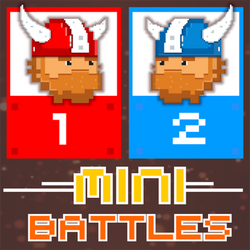
12 MiniBattles is a two-player party game built for sharing one keyboard with a friend. Each player gets a single button. Player 1 presses A and Player 2 presses L. A spinner picks a random mini-game, you fight it out for a few seconds, and the winner takes a point on the red-versus-blue scoreboard before the next spin.
Despite the name, there are far more than 12 games. Shared Dreams Studios kept adding modes after the first release, and different versions list 36, 42 or 44 mini-battles. You get pixel-art duels where you shoot first, wild physics soccer, rooftop sniper fights, tennis rallies, boxing, thumb wrestling, hand-slap duels, lava jumping, balloon popping, a firefighter helicopter, frog tongues catching flies, golf hole-in-ones and more. Because every game runs on the same single button, nobody needs a tutorial. Whether you tap, hold or time the press is the whole skill, and it changes from one mini-game to the next.
The game started on Android and later came to the web. It was second runner-up in the 2018 CrazyGames Developer Contest, where judges praised its two-player design, quick pacing and single-button input. Rounds last seconds, the results are often hilarious, and the random spinner keeps both players guessing. It works well as a quick rivalry with a sibling, a classmate or a friend on the couch. Note that it is strictly local: both players share the same device.
How to Play 12 MiniBattles - Two Players
- Sit two players at one keyboard. Player 1 (red) uses A, Player 2 (blue) uses L.
- Press Play. A spinner rolls through the mini-game cards (Soccer Physics, Boats, Tennis, Vikings and more) and stops on a random one.
- Read the short on-screen hint and work out what your button does in this game: jump, shoot, swing, punch or turn.
- Win the mini-game to earn a point on the overall scoreboard.
- Keep spinning through new mini-battles. The player with more wins at the end is the champion.
Controls
| Key | Action |
|---|---|
| Player 1: A key | This is the only button for red. |
| Player 2: L key | This is the only button for blue. |
| Keyboard | One button per player does everything. Depending on the mini-game it shoots, jumps, kicks, rotates, steers or charges. |
| Touch screens | during a mini-game, a red A button sits at the bottom left and a blue L button at the bottom right, so two players can share one tablet. |
| Mouse / tap | start the spinner with the Play button and use the menus. |
Tips and Tricks
- Read the first second of every round. The same button can mean tap to jump in one game and hold to charge in the next. Players who adapt fastest win the most points.
- Don't mash by default. In duels and sniper games, one well-timed press beats panicked spamming, which often wastes your shot.
- Find the rhythm. In games where your character or aim moves on its own, the skill is pressing at the right moment, not pressing more often.
- In physics soccer, time your jumps. A well-timed kick or jump moves the ball further than constant presses that leave you tumbling.
- Watch your opponent's habits. Some players always fire early. Let them miss, then punish.
- Stay on the keys. Rounds start fast after the spinner, so keep your finger on A or L between games.
FAQ
How do you play 12 MiniBattles?
Two players share one device and each gets one button. A spinner chooses a random mini-game, you compete for a few seconds, and the winner gets a point on the overall scoreboard. Then the next mini-game is spun.
What are the controls for 12 MiniBattles?
Player 1 uses the A key and Player 2 uses the L key. That single key is the only control each player needs. Its job changes with each mini-game (shoot, jump, kick, punch, steer).
Can you play 12 MiniBattles single player?
No. It is built as a two-player game and has no computer opponent. If you are alone you can control both sides (A and L) to learn the mini-games, but the fun is playing against a real person.
How many mini-games are in 12 MiniBattles?
More than the name suggests. The game launched with 12 and grew through updates. Portal listings mention 36 or more, the Android itch.io page says 42, and the Steam version says 44. The exact number depends on the version.
Can you play 12 MiniBattles online against a friend?
No. This browser version is local multiplayer only: both players use the same keyboard or screen. There is no online matchmaking. The Steam release supports Remote Play Together, but that is a Steam feature.
Who made 12 MiniBattles?
12 MiniBattles was made by Shared Dreams Studios (developer Mariano Maffia). It first appeared on Android in 2017, reached the web in 2018, and came to Steam in September 2020.
What kinds of mini-games are included?
Cards on the spinner include Soccer Physics, Gangsters, GOLLLL!, Vikings, Timber Man, Boats, Tennis and Pocket Basket. Across versions you also get quick-draw duels, physics soccer, rooftop sniper battles, tennis, boxing, thumb wrestling, hand-slap duels, board breaking, lava leaping, balloon popping, a firefighter helicopter, a frog catching flies, hole-in-one golf, boat rescues, basketball and more. All of them use one button.
Is 12 MiniBattles like Rooftop Snipers or Soccer Physics?
Yes, partly. The developer's description says it includes fan-made takes on popular one-button titles such as Rooftop Snipers and Soccer Physics, alongside its own original duels.
Is there a 12 MiniBattles 2?
Yes. Shared Dreams Studios released 12 MiniBattles 2 as a separate sequel with new mini-games. This page is the original 12 MiniBattles.
How do you win in 12 MiniBattles?
Win as many individual mini-battles as you can. Each win adds a point to your color on the shared counter, and the player who leads the scoreboard is the champion. Adapting quickly to each new game matters more than mastering any single one.
Did 12 MiniBattles win any awards?
It was named second runner-up in the 2018 CrazyGames Developer Contest. The jury singled out the two-player setup, the variety of games, the retro graphics and the single-button input.
Can two people play 12 MiniBattles on one Chromebook at school?
Yes. Both players share the laptop keyboard, one on A and one on L, so you only need a single device. HopArcade runs it in the browser with nothing to install, though some school networks may still filter game sites.

Comments (0)
Join the conversation
Log in to share tips about this game.
No comments yet. Be the first to share a tip!