
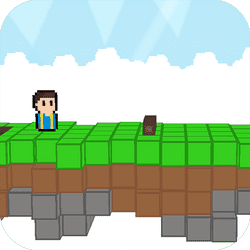
Sky Bros is a free 2-player party game you can play unblocked in your browser. Grab a friend, share one keyboard and battle through four quick mini-games set on floating sky islands, or let shuffle mode pick for you. With one-button controls, anyone can jump in and play.
About Sky Bros - 2 Players
Sky Bros (also listed as Sky Bros - 2 Players) is a local multiplayer party game built for two people on one keyboard. You and your bro find yourselves up in the sky and decide to settle things the only way that makes sense: a series of silly head-to-head challenges.
The game includes four mini-games, such as Archery, where you try to hit your opponent with a well-aimed arrow. If you cannot decide what to play, shuffle mode mixes the games up for you, keeping every session fresh.
What makes Sky Bros so easy to pick up is its one-button control scheme. Player 1 uses W and Player 2 uses the Up Arrow. That is it. Matches are all about timing and rhythm rather than memorising complicated controls, so new players can compete with experienced ones within seconds.
Scores are shown at the top of the screen, and the first player to reach the target wins the round. Because there is nothing to download, Sky Bros works right in your browser, making it a great choice for a quick competition with a friend during a break. Find your rhythm, break your opponent's flow, and prove who the best bro is.
Because rounds finish quickly, it suits lunchtime breaks, sleepovers, or settling friendly arguments. Cheers, groans and laughter usually follow each surprising comeback, and rematches happen constantly.
How to Play Sky Bros - 2 Players
- Pick one of the four mini-games or choose shuffle mode. Each player presses their single button at the right moment to jump, aim or act in the current game. Score points against your friend; the first to reach the target score wins.
Controls
| Key | Action |
|---|---|
| Player 1 | W |
| Player 2 | Up Arrow |
Tips and Tricks
- Watch the rhythm of each mini-game before pressing; timing beats button mashing.
- Do not rush. Panicked presses are the easiest way to lose a round.
- Try to break your opponent's flow while keeping your own steady.
- Use shuffle mode to practise every mini-game and find your favourite.
FAQ
Can I play Sky Bros online?
No—it is local 2-player only. Both players share one keyboard.
How many mini-games?
Four mini-games (including Archery) plus a shuffle mode that mixes them.
What are the controls?
One button each: Player 1 presses W, Player 2 presses Up Arrow. Time the press to jump, aim or act in the current mini-game.
How do I win?
Score points against your friend in the chosen mini-game or shuffle; the first to win the set of silly challenges comes out on top—follow each mode’s on-screen scoring.
Should I mash the button?
No. Tips say watch the rhythm first—panicked presses are the easiest way to lose a round.
What is Archery?
One of the four mini-games: hit your opponent with a well-aimed arrow using timed button presses.
Do I need two controllers?
No—one keyboard is enough. W vs Up Arrow is the whole scheme.
Is there a single-player campaign?
The page presents Sky Bros as a local multiplayer party game for two people. Bring a friend (or play both sides) rather than expecting a deep solo story.
Shuffle mode?
Shuffle mixes the four mini-games so rounds stay unpredictable—useful when you do not want to vote on one mode.
Can I play Sky Bros unblocked at school?
Yes if HopArcade loads—free local 2P browser party game with no download. Kept as the single school FAQ.






Comments (0)
Join the conversation
Log in to share tips about this game.
No comments yet. Be the first to share a tip!