
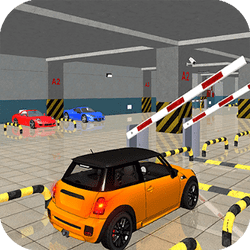
Perfect Car Parking is a free 3D parking game you can play unblocked in your browser. Choose your car colour in the garage, then guide it into the marked spot without touching a single cone. Levels unlock one by one, so every clean park opens up a new challenge.
About Perfect Car Parking
Perfect Car Parking is a 3D driving game that is all about precision, not speed. Before you hit the road, you visit the garage and pick a colour for your car. Then it is time to prove your skills.
Each level drops you into a parking area lined with traffic cones. Your job is to steer carefully into the target space. Sounds easy? The catch is that hitting a cone fails the level, so every turn and every reverse has to be controlled. Levels unlock one by one, which means you need to finish each stage before moving on to the next, harder one.
The game runs in the browser using WebGL, so there is nothing to download or install. That makes it a great pick for a quick break on a school Chromebook. On-screen buttons let you switch the camera view to check your angles, pause the game, or open the settings menu.
If you like games that reward patience and careful driving, Perfect Car Parking is a satisfying challenge. Start slow, learn how your car turns, practise tricky reverse manoeuvres, judge distances calmly, mirror real-life techniques, and work your way through the levels until you can park perfectly every time.
How to Play Perfect Car Parking
- Pick a car colour in the garage.
- Drive forward and steer toward the marked parking spot.
- Reverse and adjust your angle if needed.
- Park inside the spot without hitting any cones to clear the level and unlock the next one.
Controls
| Key | Action |
|---|---|
| Up Arrow / W | drive forward |
| Arrow keys / WASD | steer and reverse |
| On-screen buttons | change camera, pause, and settings |
Tips and Tricks
- Drive slowly: small, gentle inputs make it much easier to avoid cones.
- Use the camera button to get a better view of tight gaps before you commit.
- Reverse a little and straighten out instead of forcing a sharp turn.
- Remember that touching any cone fails the level, so give them extra space.
FAQ
What are the controls?
Up Arrow/W drive forward; arrow keys or WASD steer and reverse. On-screen buttons change camera, pause and settings.
What happens if I hit a cone?
Hitting a cone fails the level—you must retry to unlock the next stage.
Can I change my car?
You can pick a car colour in the garage before driving. That is the customisation documented on this page.
How do I park successfully?
Drive slowly with small inputs into the marked bay. Reverse and straighten instead of forcing a tight angle; use the camera button to peek gaps before committing.
Is this about speed?
No—About text stresses precision, not speed. Slow is usually faster than resetting after a cone.
Should I use reverse?
Yes. Many bays need a reverse adjust to square up. Forcing only forward turns is how cones get clipped.
Camera tip?
Use the on-screen camera control to judge tight gaps before you commit the car—especially useful when cones hide a corner of the bay.
How do levels progress?
Clear the marked parking spot without cones to finish the level and continue. Failed cone hits send you to retry.
Keyboard or on-screen only?
Both appear: WASD/arrows for driving plus on-screen camera/pause/settings buttons.
Can I play Perfect Car Parking unblocked at school?
Yes if HopArcade loads—free browser precision parking with no download. Kept as the single school/unblocked FAQ.









Comments (0)
Join the conversation
Log in to share tips about this game.
No comments yet. Be the first to share a tip!