
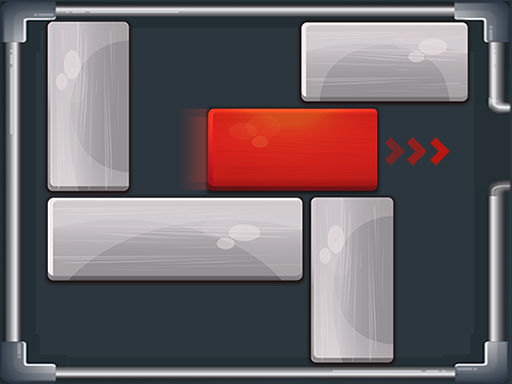
A red block needs a clear route to the exit, and the other pieces are in its way. Unblock Puzzle gives you a small board to rearrange by sliding blocks along their allowed direction. It is a spatial puzzle to try after Sudoku or Mahjong Connect when you want to think about positions rather than digits or matching symbols.
About Unblock Puzzle
Unblock Puzzle places a red target piece inside a board crowded with other blocks. The task is to move the surrounding pieces until the target can slide out. Every block occupies real space, so opening one route often requires making room somewhere else first.
Begin by locating the exit and tracing the straight path the red block needs. The pieces crossing that path are your immediate obstacles. Look at the empty squares available to each obstacle and decide which one can move without trapping another piece. A block usually slides along its own length, so a horizontal piece and a vertical piece create different options.
Dragging a block is the basic action. Move one piece, then reconsider the board rather than continuing with a fixed sequence that no longer fits. Sometimes moving a block away from the target is useful because it frees the space needed for a later step. Work backwards from the exit when the next action is unclear.
This is a good companion to the site’s other logic games because the whole problem remains visible. There is no hidden mine to uncover and no new bubble to aim; the challenge is arranging the pieces already present. Treat early attempts as experiments in space, and restart when you want to test a shorter or clearer route. Aim first for a correct solution, then consider whether the same board could be solved with fewer unnecessary moves.
How to Play Unblock Puzzle
- Press Play and follow the opening tutorial.
- Hold and drag a block along its length to make room for the red block.
- Move the red block to the opening on the right; try to use as few moves as possible.
Controls
| Key | Action |
|---|---|
| Mouse drag | Slide a block along its length |
FAQ
What is the goal?
Slide blocks until the red target can exit. On this page the red block leaves through the opening on the right; fewer moves is the challenge.
Why can’t I move a block every way?
Blocks only slide along their length—horizontal pieces move left/right, vertical pieces move up/down—and only into empty space.
What should I try when stuck?
Work backwards from the exit: list pieces crossing the red block’s straight path, free one of those first, and remember that moving a block away from the target can unlock the next slide.
How do I use fewer moves?
Trace the red block’s straight path to the exit, then move only what blocks that path. Avoid random slides that reshuffle the whole board.
What are the controls?
Hold and drag a block along its permitted direction with mouse or finger. Follow the opening tutorial after Play.
Is this Unblock Me / traffic-jam style?
Yes—it is the sliding-block “free the red piece” puzzle genre (often called Unblock Me). This HopArcade page titles it Unblock Puzzle.
Should I move the red block first?
Usually not until its path is clear. Early red nudges without space just jam the board; clear crossing pieces first.
Do vertical and horizontal blocks interact?
Yes—each occupies grid space. Sliding a vertical piece may open a lane for a horizontal one (or the red target). Think in terms of freeing lanes, not isolated moves.
Is there a move counter?
The how-to asks you to free the red block with as few moves as possible—treat efficiency as the score chase even if the HUD presentation varies by build.
Can I play Unblock Puzzle unblocked at school?
Free browser sliding-block puzzle with no download. Works when HopArcade is allowed.




Comments (0)
Join the conversation
Log in to share tips about this game.
No comments yet. Be the first to share a tip!