
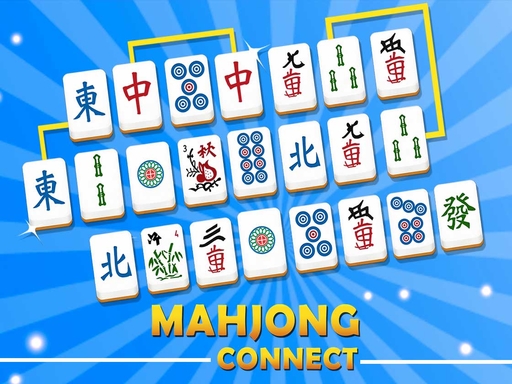
Mahjong Connect is a tile-matching puzzle built around finding pairs and opening space on the board. Look for two identical symbols, then check whether the game accepts a connection between them. Removing a useful pair can expose several more choices, so it pays to scan the board instead of simply clicking the first duplicate you notice.
About Mahjong Connect
Matching is only the first check
The important distinction in Mahjong Connect is that spotting two matching pictures does not always make them a removable pair. Their positions matter as well. A crowded board can block a connection, while an open edge or a gap created by an earlier match can make the same pair playable later.
Begin by examining the outer part of the layout. Pairs near an edge are often easier to understand because there are fewer tiles around them. When the game rejects a selection, move on to another pair and come back after you have opened more room. Repeatedly selecting a blocked match will not improve the situation.
Make the board easier to read
A steady scanning pattern helps you avoid overlooking a simple pair. Work across a row, remember a few distinctive symbols, and compare them with the next part of the grid. Clearing a pair that creates a useful gap can be more helpful than removing an isolated match far from the crowded area.
This game offers a different kind of thinking from Sudoku, 2048 and Minesweeper unblocked. You are reading pictures and paths rather than placing digits or planning a tile merge. It is a good choice when you want a puzzle you can understand visually, with a small decision at each turn. Supplier advertisements may appear while the game loads.
How to Play Mahjong Connect
- Press the play arrow and choose an unlocked level.
- Click a tile, then a matching tile that can connect to it. Follow the opening highlighted pair to learn the interaction.
- Remove matching pairs before the timer runs out.
Controls
| Key | Action |
|---|---|
| Mouse click | Select two matching tiles |
FAQ
Why can two identical tiles fail to match?
Mahjong Connect also requires a clear connecting path. Other tiles can block the route, so the same pair may become playable after you clear space nearby.
Where should I look first?
Scan outer edges and gaps. Edge tiles usually have clearer connection paths than pieces buried in a crowded centre.
Is there a timer?
Yes. Remove matching pairs that can connect before the timer runs out. Clearing outer blockers early opens the board for the rest.
How do I find pairs more consistently?
Scan one row at a time and remember distinctive symbols. Prefer matches that open space for other pairs over repeatedly clicking a still-blocked connection.
What are the controls?
Mouse click (or tap) to select two matching tiles that share a legal path. Press play, pick an unlocked level, and follow the highlighted opening pair if shown.
How does a legal path work?
The path between the two tiles must connect with limited line segments without crossing blocking tiles (classic Mahjong Connect / Shanghai-link rules). If the path is blocked, clear neighbours first.
Should I clear centre pairs early?
Usually prioritise edges and pairs that open corridors into the centre. Early centre matches can leave awkward isolated tiles against the timer.
What happens when I select a bad second tile?
If they do not match or cannot connect, the selection simply fails—choose another partner or clear blockers, rather than assuming the tiles are “broken”.
Is this the same as Mahjong solitaire (Shanghai)?
Related but different: Connect requires a free path between two matching tiles on a 2D board with a timer, not the layered tile-stack free-on-left-or-right rules of classic Mahjong solitaire.
Can I play Mahjong Connect unblocked at school?
Free browser matching puzzle with no download. Loads when HopArcade is allowed.







Comments (0)
Join the conversation
Log in to share tips about this game.
No comments yet. Be the first to share a tip!