
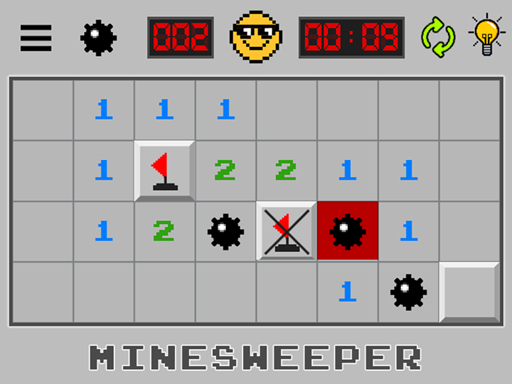
Minesweeper is the classic logic puzzle. The board hides a set number of mines, and every square you open shows how many mines touch it. Use those numbers to clear the board safely.
About Minesweeper
Your first click is always safe and usually opens a large area. From there, each number tells you how many of the eight surrounding squares contain a mine. If a 1 touches only one unopened square, that square must be a mine, so you flag it. Chains of simple deductions like this let you clear most of the board without guessing.
The game has three standard sizes. Beginner is a small board with ten mines, intermediate is a medium board, and expert is a wide board with ninety-nine mines. Fast players race the clock, while others enjoy it as a calm logic exercise.
How to Play Minesweeper
- Press Play and pick a difficulty.
- Click any square to start; the first click is always safe.
- Right-click a square to place a flag where you think a mine is.
- Open every safe square to win.
Controls
| Key | Action |
|---|---|
| Left click | Open a square |
| Right click | Place or remove a flag |
| Long press | Flag on touch screens |
Tips and Tricks
- Look for 1-2-1 and 1-2-2-1 patterns along edges; they always have the same solution.
- Clicking a number that already has the right number of flags opens all its neighbors.
- When you must guess, choose squares in the corners of the board, where fewer mines tend to touch.
FAQ
Can Minesweeper always be solved without guessing?
Not always. Some boards require a guess, especially near the end, but most can be solved with logic.
How many mines are on the expert board?
The standard expert board has 99 mines on a 30 by 16 grid.
Is this Minesweeper unblocked?
Yes. It is a browser version, so you do not need Windows or any download. It works on Chromebooks, Macs and phones as long as your network allows the site.






Comments (0)
Join the conversation
Log in to share tips about this game.
No comments yet. Be the first to share a tip!